What I love about M1 Spend is that it finally solves a problem I’ve watched people struggle with for years. You have your checking account at one bank, your investments at another brokerage, and every time you want to move money between them, you’re waiting 3-5 business days and logging into many platforms.
M1 Spend puts your checking account right inside your investment platform, so transferring money happens instantly.
You can move cash from checking to your investment portfolio in seconds, not days. And you’re earning 3.30% interest on your checking balance while you decide what to do with it.
You Also Might Be Interested In:
What M1 Spend Actually Does
M1 Spend is a checking account that lives inside M1 Finance’s investment platform. You get a debit card, direct deposit, bill pay, and all the normal checking account features.
The difference is that your checking account sits right next to your investment accounts on the same dashboard. When you want to invest money, you don’t need to initiate a transfer and wait.
You just move it instantly.
This matters more than it sounds like it would. Most people keep too much cash sitting in checking accounts earning nothing because moving it to investments feels like a hassle.
M1 Spend removes that friction completely.
The account comes through M1’s partner bank (currently Lincolnshire Savings Bank), so your deposits are FDIC insured up to $250,000. You’re getting real banking protection, not some experimental fintech setup.
The Interest Rate Situation
M1 Spend pays 3.30% APY on your checking balance. That’s substantially higher than what traditional banks offer.
Most big banks pay 0.01% to 0.05% on checking accounts. If you keep $15,000 in checking (which isn’t unusual if you’re managing expenses carefully), you’re earning about $495 per year with M1 Spend instead of $7.50 with a traditional bank.
That’s real money.
The rate isn’t fixed forever, though. Like all interest rates, M1 can adjust it based on market conditions.
Right now it’s competitive, but you’ll want to check current rates when you’re making your decision.
[Open your M1 Finance account with M1 Spend here and start earning 3.30% APY on checking today]
Smart Transfers Changed How I Think About Cash Management
This feature is where M1 Spend gets genuinely useful. You set a least cash balance you want to keep in checking.
Let’s say $2,000.
Any money above that threshold automatically transfers to your investment accounts. You don’t touch anything.
You don’t remember to do it.
It just happens.
For someone trying to build wealth consistently, this removes the biggest behavioral obstacle. Money that would normally sit in checking for weeks or months gets invested immediately.
Here’s a real example of how this works:
You get paid $5,000. Your checking balance goes to $7,000.
M1 Spend automatically moves $5,000 to your investment portfolio, leaving your $2,000 buffer intact.
The $5,000 starts growing in the market instead of earning 3.30% in checking.
Over 20 years, that difference compounds significantly.
Smart Transfers also works in reverse. If your checking drops below your minimum, M1 can automatically pull money from your investments to maintain your buffer.
This prevents overdrafts without you needing to watch balances constantly.
Fees You Don’t Pay
M1 Spend charges no monthly maintenance fee, no least balance requirement, and no foreign transaction fees. Most premium checking accounts need you to maintain $5,000 to $15,000 to avoid monthly charges.
M1 removes that requirement completely.
You get one ATM fee reimbursement per month with the free account. If you upgrade to M1 Plus (which costs $125 annually or $10 monthly), you get four ATM fee reimbursements per month.
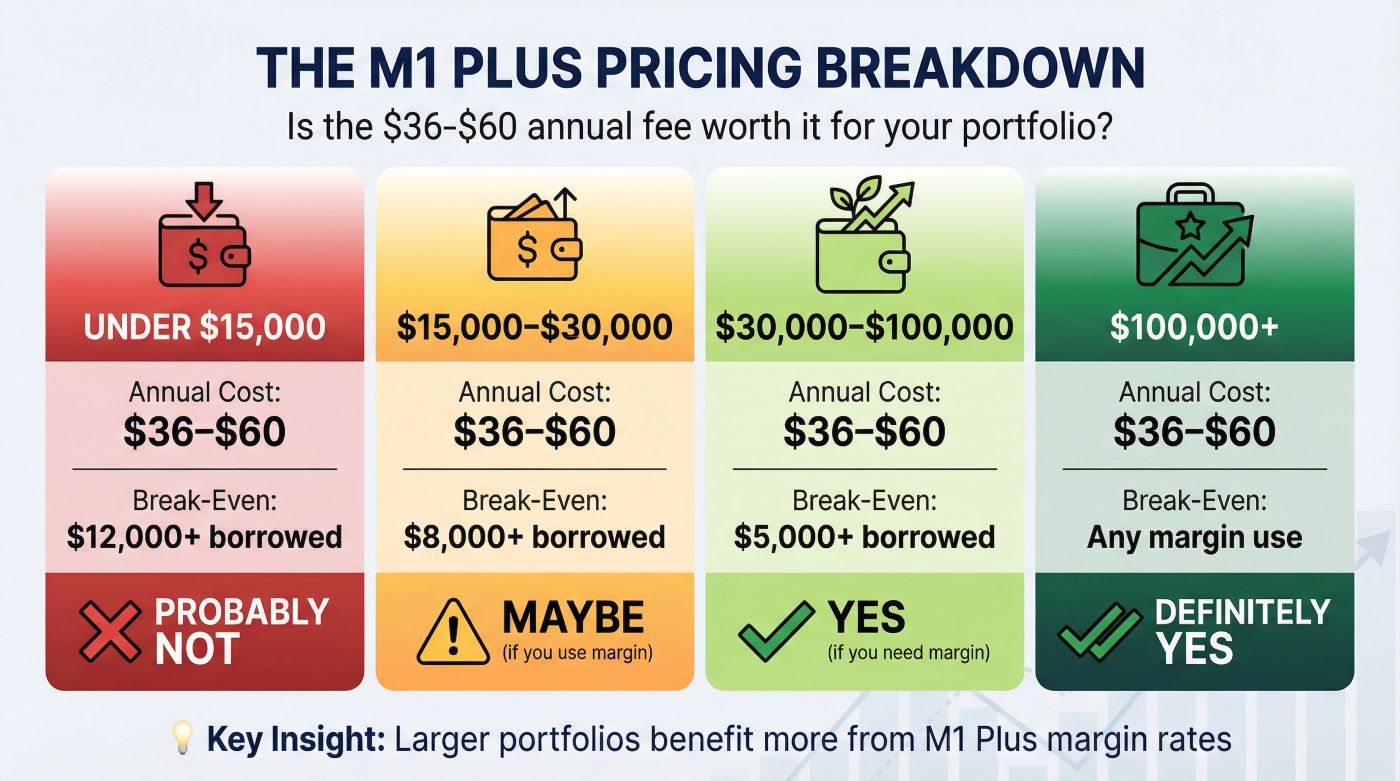
The M1 Plus subscription also lowers your borrowing rate if you use margin loans. The standard rate is 8.00% and M1 Plus drops it to 6.50%.
This only matters if you actually borrow against your portfolio, which most conservative investors don’t do.
For most people, the free version of M1 Spend works perfectly well. The M1 Plus upgrade makes sense if you’re using margin borrowing or you need more ATM access.
The 1% Cash Back Feature
Every purchase you make with your M1 Spend debit card earns 1% cash back. The cash deposits directly into your M1 Spend account.
Credit cards often offer 1.5% to 2% cash back, so this isn’t generous by credit card standards. But checking account debit cards rarely offer any rewards at all.
If you spend $25,000 annually on your debit card, you’ll earn $250. That’s $250 you can invest or keep as part of your cash buffer.
The advantage of debit card rewards over credit card rewards is that you’re spending money you actually have. You’re not running up credit card balances to chase rewards points.
For self-employed professionals managing business expenses, using M1 Spend for business purchases adds up quickly. If you’re running $50,000 in business expenses through the card annually, that’s $500 in cash back.
This M1 Spend Review Needs to Address the Inflation Question
People ask whether 3.30% APY protects against inflation. The honest answer is that it roughly keeps pace with current inflation rates (around 2.5% to 3%), but it doesn’t beat inflation by much.
Money in M1 Spend maintains its purchasing power. It doesn’t grow your wealth significantly.
That’s fine, because checking account balances shouldn’t be your wealth-building strategy anyway. M1 Spend works best as a holding area for operational funds while your investments handle actual growth.
If you’re concerned about outliving your savings, the solution isn’t keeping more in checking. The solution is investing appropriately for your timeline and risk tolerance, then using M1 Spend to manage the cash flow in and out of those investments efficiently.
Your checking balance should cover 1-3 months of expenses, maybe 6 months if you want extra security. Everything else should be invested where it can actually grow faster than inflation.
How M1 Spend Fits Your Retirement Planning
If you’re managing a 401(k) rollover, M1 Spend becomes useful as a transition account. When you roll over a large 401(k) balance, you often feel pressured to allocate it immediately.
That pressure leads to hasty decisions.
With M1 Spend, you can move the rollover funds into checking where they’ll earn 3.30% while you research your options. Take two months to figure out whether you want ETFs, target-date funds, or a different allocation strategy.
Your money is earning competitive interest while you make good decisions instead of rushed ones.
For people practicing the FIRE strategy (Financial Independence, Retire Early), M1 Spend streamlines your accumulation phase. Your income lands in checking, Smart Transfers automatically invest excess cash, and you’re not manually moving money every paycheck.
This automation removes decision fatigue. You set it up once and it runs without constant attention.
Pre-retirees transitioning from accumulation to distribution benefit from the reverse flow. You can set up automatic transfers from your investment accounts to M1 Spend monthly or quarterly, creating a systematic withdrawal plan.
The cash accumulates in checking earning 3.30% until you need to spend it.
[Start managing your retirement cash flow more efficiently with M1 Spend and investment integration]
Who This Actually Works Best For
M1 Spend fits specific financial situations better than others.
Young professionals building wealth: If you’re in your 20s or 30s and accumulating capital, M1 Spend’s automation removes friction from consistent investing. You’re not losing money to account fees and you’re not leaving cash sitting idle.
Self-employed professionals: When your income is irregular, M1 Spend helps smooth out cash management. You can receive client payments, maintain a buffer for lean months, and automatically invest excess during profitable months.
Mid-career people with complex accounts: If you’re managing many retirement accounts, investment portfolios, and daily expenses across different institutions, M1 Spend consolidates at least two of those functions. Your checking and investing live in one place.
People who hate financial complexity: If you have analysis paralysis when choosing between different account types and investment options, M1 Finance’s simplified approach (including M1 Spend) reduces your decisions to a manageable number.
M1 Spend works less well if you need extensive branch access, if you write lots of paper checks, or if you prefer talking to a banker face-to-face regularly. M1 Finance is a digital platform, not a traditional bank with physical locations.
The Real Integration Benefits
When I’m doing an M1 Spend review, the integration benefits matter more than any single feature.
You see your checking balance, investment portfolio, and overall net worth on one dashboard. This perspective shift helps you manage money more comprehensively instead of in isolated silos.
Most people underestimate how much mental energy they spend tracking balances across many institutions. Every login, every transfer, every reconciliation uses cognitive resources.
M1 Spend eliminates most of that overhead.
Here’s what a typical month looks like:
Your paycheck deposits to M1 Spend. Smart Transfers automatically move excess cash to investments.
Your portfolio rebalances automatically based on your target allocation.
You spend from your debit card earning 1% cash back. Your cash back deposits to checking and eventually gets auto-invested when it exceeds your threshold.
You’re not touching any of this manually. You check in periodically to watch progress, but the system runs itself.
That’s the real value proposition: reduced friction and automated execution.
Common Limitations to Understand
M1 Spend doesn’t offer joint accounts now. If you need to share a checking account with a spouse or partner, you’ll need to keep a traditional bank account for that purpose.
The platform limits you to one deposit per trading window (usually early afternoon). If you’re moving large amounts often throughout the day, this constraint might frustrate you.
For most normal use cases, it’s not an issue.
M1 Finance deliberately keeps things simple, which means they don’t offer options trading, person bonds, or complex financial products. If you need those instruments, you’ll need to use a different brokerage.
Customer support is solid but not white-glove service. You’ll get help when you need it, but you won’t have a dedicated relationship manager.
For most people, the trade-off (simplified platform with good support) beats complex platforms with personal service they rarely use.
Setting Up M1 Spend Takes About 15 Minutes
You need an M1 Finance account first. If you don’t have one yet, the signup process takes about 10 minutes.
You’ll verify your identity, link funding sources, and answer basic questions about your investment goals.
Once you have an M1 Finance account, adding M1 Spend takes another 5 minutes. You choose your debit card design, set up direct deposit information if you want it, and configure Smart Transfers with your preferred cash threshold.
Your debit card arrives in 7-10 business days. You can start using digital wallet features (Apple Pay, Google Pay) before the physical card arrives.
The initial funding can come from an external bank account via ACH transfer (2-3 business days) or wire transfer (same day but usually costs $20-30).
[Get started with M1 Finance and add M1 Spend to consolidate your banking and investing]
Comparing M1 Spend to Traditional Banking
Traditional banks offer physical branches, extensive ATM networks, and established brand trust. They also pay essentially nothing on checking balances and create friction between your banking and investing.
M1 Spend sacrifices physical presence and universal ATM access in exchange for higher interest rates, investment integration, and automation.
The right choice depends on your priorities.
If you value face-to-face service and you’re comfortable keeping checking and investing separate, traditional banks work fine.
If you’re managing your finances digitally anyway and you want your money working harder, M1 Spend removes obstacles that traditional banking creates.
The Tax Efficiency Angle
For self-employed professionals, M1 Spend simplifies tracking business expenses when you use the debit card for business purchases. You’re earning 1% cash back on business expenses that you’re deducting anyway.
The interest you earn on M1 Spend is taxable as ordinary income, just like any other bank interest. M1 Finance will send you a 1099-INT if you earn more than $10 in interest annually.
This is straightforward tax reporting. Your accountant won’t have any trouble with it.
The real tax efficiency comes from the investment side of M1 Finance, not M1 Spend specifically. When you’re investing in tax-advantaged accounts (IRAs, Roth IRAs) through M1 Finance and managing cash flow through M1 Spend, you’re optimizing the entire system.
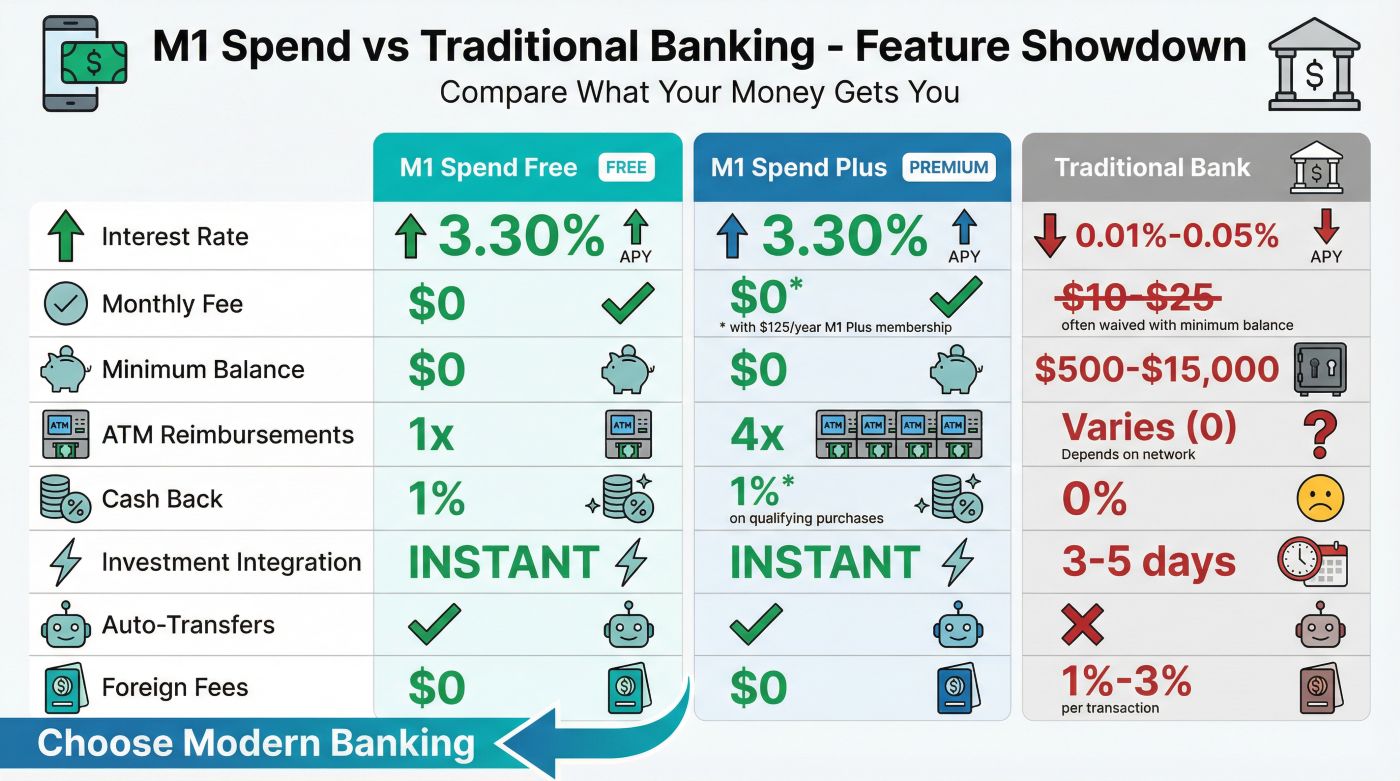
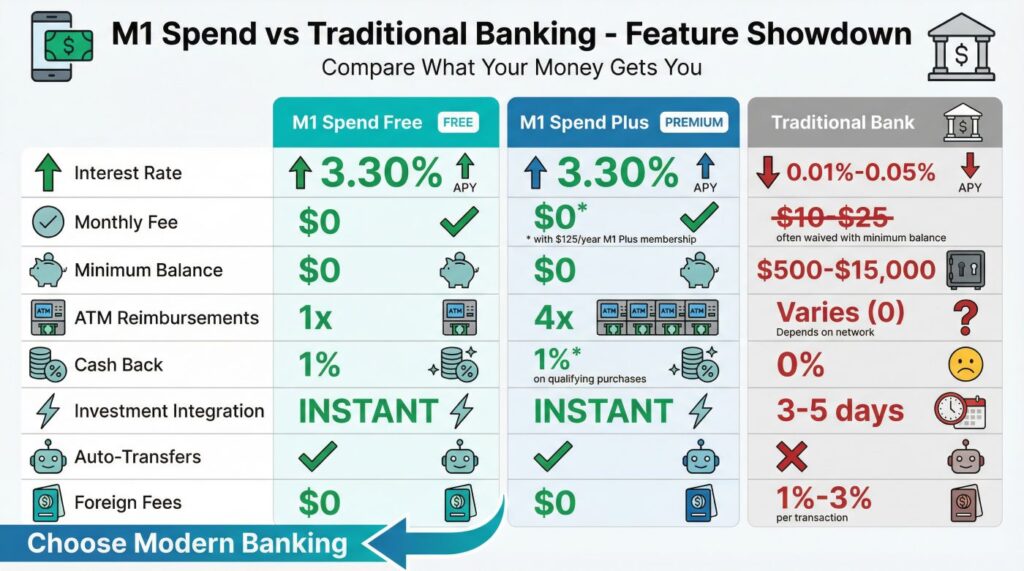
M1 Spend Feature Comparison Table
| Feature | M1 Spend (Free) | M1 Spend (Plus) | Traditional Bank |
| Interest Rate (APY) | 3.30% | 3.30% | 0.01%, 0.05% |
| Monthly Fee | $0 | $0 (but $125/year M1 Plus) | $10-$25 (often waived) |
| Minimum Balance | $0 | $0 | $500, $15,000 |
| ATM Fee Reimbursements | 1 per month | 4 per month | Varies (often 0) |
| Debit Card Cash Back | 1% | 1% | 0% |
| Investment Integration | Yes (instant transfers) | Yes (instant transfers) | No (3-5 day ACH) |
| Smart Auto-Transfers | Yes | Yes | No |
| Foreign Transaction Fees | $0 | $0 | 1%, 3% |
Making the Decision
An honest M1 spend review comes down to whether the integration benefits matter for your specific situation.
If you’re already using M1 Finance for investing, adding M1 Spend is obvious. You get higher interest than most checking accounts and you remove transfer friction.
If you’re not now using M1 Finance, the decision gets more complex. You’re evaluating the entire platform, not just the checking account.
M1 Finance works well for people who want simplified, automated investing. You build a portfolio of ETFs weighted however you want, and M1 automatically rebalances it.
You don’t trade person stocks actively.
If that approach matches your investing philosophy, M1 Spend becomes a valuable addition to an already useful platform.
If you prefer active trading, options strategies, or you’re working with a financial advisor using different tools, M1 Finance (and M1 Spend) probably doesn’t fit your needs.
The Bottom Line on M1 Spend
M1 Spend solves a specific problem: the friction between daily banking and long-term investing. For someone managing retirement accounts, building wealth systematically, or handling irregular income from self-employment, that friction costs real money over time.
The 3.30% APY gets your attention, but the Smart Transfers and instant investment integration create the actual value.
You’re removing behavioral obstacles that prevent consistent investing. You’re automating decisions that drain mental energy.
You’re consolidating accounts that don’t need to be separate.
The platform isn’t perfect. You sacrifice some features that traditional banks offer.
You’re learning a new interface.
You’re trusting a fintech company instead of an established bank (though your deposits are still FDIC insured).
For most people concerned about building wealth efficiently, managing rollovers thoughtfully, or reducing financial complexity, those trade-offs favor M1 Spend.
[Open your M1 Finance account with M1 Spend and start consolidating your financial management today]
The best way to assess M1 Spend is to try it. You can open an account with minimal funding, test the features, and see whether the integration benefits match your workflow.
If it doesn’t fit, you’re out maybe an hour of setup time.
If it does fit, you’ve eliminated friction that was costing you time and money every month without you fully realizing it.
That’s what this M1 spend review really comes down to: whether removing friction between banking and investing matters enough to justify switching from what you’re now doing. For many people, it absolutely does.